Quick Answer:
The UTM (Universal Transverse Mercator) coordinate system divides the Earth into 60 longitudinal zones, each 6 degrees wide, and projects each zone onto a flat 2D grid measured in metres. The USA spans UTM zones 10N through 19N. WGS84 UTM zones use the EPSG codes 32601 to 32660 for the northern hemisphere and 32701 to 32760 for the southern hemisphere. UTM gives you flat, metre-based X and Y coordinates that make distance, area, and direction calculations accurate and straightforward, which is why it is the standard coordinate system for satellite imagery, surveying, and GIS analysis.
Intro-
Every geospatial dataset has a coordinate reference system (CRS) that defines how pixel positions or vector coordinates relate to real locations on the Earth’s surface. Latitude and longitude are the most widely recognised CRS but they are not the most useful for measurement. The UTM coordinate system converts the curved Earth into flat, metre-based grids where distance calculations are straightforward and distortion is kept below 0.1% within each zone.
For satellite imagery, engineering surveys, and GIS analysis in the USA and globally, UTM is the standard delivery projection. This guide explains how it works, which zones cover the USA, how WGS84 ties into UTM, and how to apply it correctly in your workflows.
What Is the UTM Coordinate System?
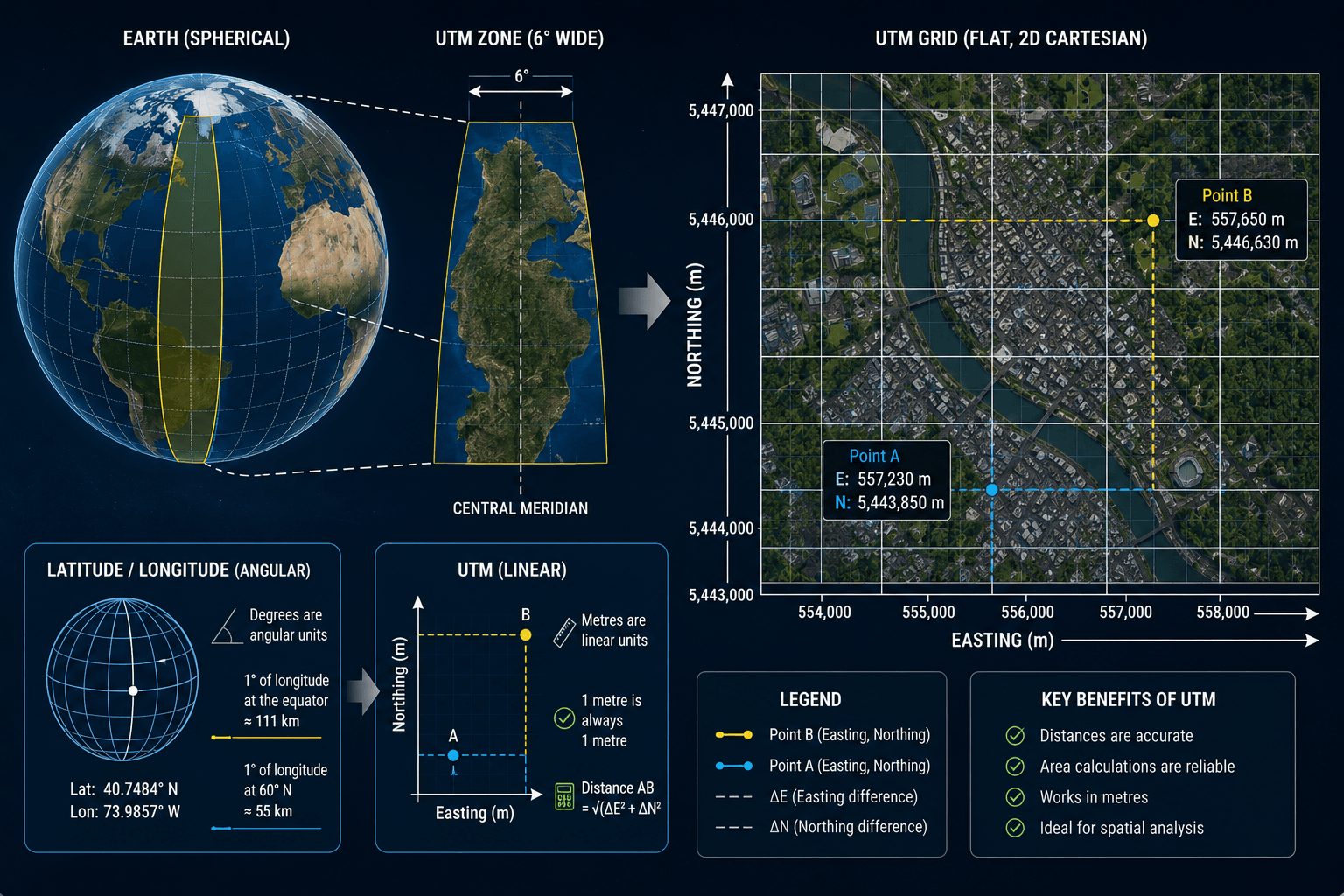
The Universal Transverse Mercator system is a global map projection that converts the Earth’s curved surface into a series of flat, 2D Cartesian grids. Instead of expressing location in degrees of latitude and longitude, UTM expresses location in metres east (Easting) and metres north (Northing) of a defined origin point within each zone.
This matters because degrees are angular units, not linear ones. One degree of longitude at the equator is approximately 111km. One degree of longitude at 60 degrees north latitude is approximately 55km. You cannot calculate the straight-line distance between two lat/lon points with simple subtraction. You need spherical trigonometry.
In UTM, one metre is always one metre. The distance between two UTM coordinates is the square root of the squared difference in Easting plus the squared difference in Northing: standard Pythagorean geometry. This makes UTM far more practical for any workflow involving area calculation, distance measurement, or spatial analysis.
How UTM Zones Work
The Earth is divided into 60 UTM zones, each covering 6 degrees of longitude. Zones are numbered 1 to 60, starting at 180 degrees west and increasing eastward. Each zone extends from 80 degrees south to 84 degrees north in latitude.
Within each zone, a Transverse Mercator projection is applied. This projection wraps a cylinder around the Earth touching the central meridian of the zone, then unrolls it flat. The result is a grid where positions are measured in metres from the zone’s central meridian (Easting) and from the equator (Northing).
UTM Zone Structure
- Central meridian: Each zone has a central meridian at its midpoint. For Zone 1, the central meridian is at 177 degrees west. For Zone 60, it is at 177 degrees east.
- Easting: Distance in metres east or west of the central meridian. To prevent negative values on the western half of the zone, a false easting of 500,000m is added. This means the central meridian always has an Easting of 500,000m. Eastings range from approximately 166,000m to 834,000m within a zone.
- Northing: Distance in metres north of the equator. In the northern hemisphere, the equator starts at 0m Northing and values increase northward. In the southern hemisphere, a false northing of 10,000,000m is subtracted so that Northing values remain positive when measuring south of the equator.
- Scale factor: UTM uses a scale factor of 0.9996 at the central meridian. This intentional slight compression reduces distortion at the edges of the zone and keeps maximum distortion within any zone below 0.1%.
UTM Zones in the USA
The contiguous United States, Alaska, and Hawaii span multiple UTM zones. Knowing which zone covers your project area is the first step in any UTM-based workflow.
US UTM Zones: Contiguous States
| UTM Zone | Longitude Range | States Covered |
|---|---|---|
| Zone 10N | 126°W to 120°W | Western Washington, Western Oregon, Western California |
| Zone 11N | 120°W to 114°W | Eastern California, Nevada, Idaho, Western Montana, Arizona |
| Zone 12N | 114°W to 108°W | Utah, Colorado, Eastern Montana, Wyoming, Western New Mexico |
| Zone 13N | 108°W to 102°W | Eastern Colorado, Eastern New Mexico, Western Texas, Eastern Wyoming |
| Zone 14N | 102°W to 96°W | Kansas, Nebraska, Oklahoma, Central Texas, South Dakota, North Dakota |
| Zone 15N | 96°W to 90°W | Minnesota, Iowa, Missouri, Arkansas, Louisiana, Eastern Texas |
| Zone 16N | 90°W to 84°W | Wisconsin, Illinois, Mississippi, Alabama, Western Tennessee, Michigan |
| Zone 17N | 84°W to 78°W | Ohio, Kentucky, Georgia, South Carolina, Eastern Tennessee, Florida panhandle |
| Zone 18N | 78°W to 72°W | Virginia, West Virginia, Pennsylvania, New York, New Jersey, Maryland, Delaware |
| Zone 19N | 72°W to 66°W | Maine, Vermont, New Hampshire, Massachusetts, Rhode Island, Connecticut |
US UTM Zones: Alaska and Hawaii
Alaska is the most complex US state for UTM because of its geographic extent. It spans zones 1N through 9N, covering from the Aleutian Islands (Zone 1N) through the panhandle (Zone 8N and 9N). For statewide Alaska datasets, the Alaska Albers Equal Area Conic projection (EPSG:3338) is often used instead of UTM because it handles the full state extent with less distortion than any single UTM zone.
Hawaii spans UTM zones 4N and 5N. Zone 4N covers the northwestern Hawaiian Islands and Kauai. Zone 5N covers Maui, Oahu, and the Big Island.
WGS84 UTM Zones
WGS84 (World Geodetic System 1984) is the datum that defines the shape and size of the Earth used in modern UTM projections. It is the same datum used by GPS, and it is the reference frame for virtually all global geospatial data produced after 1987.
When someone says “WGS84 UTM Zone 14N,” they mean UTM Zone 14N projected onto the WGS84 ellipsoid. This is the standard for satellite imagery, GPS data, and most GIS datasets today.
WGS84 UTM EPSG Codes
EPSG codes are standardised identifiers for coordinate reference systems maintained by the International Association of Oil and Gas Producers. Every WGS84 UTM zone has a unique EPSG code.
Northern hemisphere: EPSG:326XX where XX is the zone number Southern hemisphere: EPSG:327XX where XX is the zone number
| Zone | Northern Hemisphere EPSG | Southern Hemisphere EPSG |
|---|---|---|
| Zone 10 | EPSG:32610 | EPSG:32710 |
| Zone 11 | EPSG:32611 | EPSG:32711 |
| Zone 12 | EPSG:32612 | EPSG:32712 |
| Zone 13 | EPSG:32613 | EPSG:32713 |
| Zone 14 | EPSG:32614 | EPSG:32714 |
| Zone 15 | EPSG:32615 | EPSG:32715 |
| Zone 16 | EPSG:32616 | EPSG:32716 |
| Zone 17 | EPSG:32617 | EPSG:32717 |
| Zone 18 | EPSG:32618 | EPSG:32718 |
| Zone 19 | EPSG:32619 | EPSG:32719 |
Other Common US Datums and Their Relationship to WGS84
NAD83 (North American Datum 1983): Used for US government mapping and surveying. NAD83 and WGS84 are nearly identical for most practical purposes, with differences typically under 1m for US locations. For satellite imagery, WGS84 is standard. For cadastral and survey data aligned to US federal datasets, NAD83 is often specified.
NAD27 (North American Datum 1927): Older datum used in legacy US mapping. NAD27 can differ from WGS84 by 10m to 100m depending on location. Reprojection from NAD27 to WGS84 requires a datum transformation, not just a zone change.
UTM vs Geographic Coordinates (Latitude and Longitude)
Understanding when to use UTM and when to use geographic coordinates is a practical GIS skill.
| Feature | Geographic (Lat/Lon) | UTM |
|---|---|---|
| Coordinate unit | Degrees | Metres |
| Distance calculation | Requires spherical trigonometry | Simple Pythagorean formula |
| Area calculation | Complex, varies by latitude | Simple, consistent in metres squared |
| Global coverage | Single CRS covers the whole Earth | 60 separate zones |
| Distortion | Low for display, high for measurement | Under 0.1% within each zone |
| Best for | Global datasets, web mapping, GPS exchange | Local and regional measurement, GIS analysis |
| Satellite imagery delivery | Common for archive previews | Standard for project delivery |
Latitude and longitude are the right choice when you need to express a location universally: a GPS coordinate, a point on a global map, or a coordinate you need to share with someone who may be using any number of GIS platforms. UTM is the right choice when you need to measure, analyse, or process spatial data accurately.
How to Find Your UTM Zone
There is a simple formula for calculating the UTM zone from any longitude:
UTM Zone = INT((Longitude + 180) / 6) + 1
Where INT means round down to the nearest whole number.
Examples
New York City at 74.0°W longitude: INT((360 – 74.0) / 6) is wrong because the formula uses signed longitude. INT((-74.0 + 180) / 6) + 1 = INT(106 / 6) + 1 = INT(17.67) + 1 = 17 + 1 = Zone 18N
Los Angeles at 118.2°W longitude: INT((-118.2 + 180) / 6) + 1 = INT(61.8 / 6) + 1 = INT(10.3) + 1 = 10 + 1 = Zone 11N
Dubai at 55.3°E longitude: INT((55.3 + 180) / 6) + 1 = INT(235.3 / 6) + 1 = INT(39.2) + 1 = 39 + 1 = Zone 40N
Special Cases and Exceptions in UTM Zoning
UTM has a small number of geographic exceptions where the standard 6-degree zone width is modified to prevent important regions from being split awkwardly across zone boundaries.
Norway and Svalbard (Zone 32V and special zones 33X, 35X, 37X): The standard UTM grid is modified in this region to keep Norway in a single zone and to handle Svalbard’s high latitude. Zones 31V and 32V are adjusted, and zones 33X, 35X, and 37X are widened to 12 degrees while 32X, 34X, and 36X are eliminated.
Polar regions: UTM does not cover latitudes above 84°N or below 80°S. These regions use the Universal Polar Stereographic (UPS) projection instead. For most US and global satellite imagery work, this limit is not relevant.
UTM in Satellite Imagery Delivery
XRTech delivers satellite imagery in UTM projection as standard for all project-level orders. The correct UTM zone is determined by the centroid of your Area of Interest (AOI). For AOIs that span more than one UTM zone, XRTech can deliver in a specified single zone or in the State Plane coordinate system for US-based projects requiring alignment with local government datasets.
Imagery delivered in UTM projection is orthorectified Level 3 data. It loads directly into QGIS, ArcGIS, AutoCAD, and other GIS or CAD platforms without requiring reprojection for most workflows.
Standard Delivery Formats From XRTech
| Format | Use |
|---|---|
| GeoTIFF with embedded CRS | Direct load into GIS software |
| IMG | ERDAS Imagine compatible |
| SHP (Shapefile) | Vector overlays in UTM |
| DWG | AutoCAD engineering workflows |
All delivered products include full CRS metadata specifying the UTM zone, EPSG code, datum (WGS84), and projection parameters.
Practical UTM Workflow for GIS Professionals
Step 1: Identify your AOI centroid longitude
Use your project coordinates to identify the central longitude of your area of interest.
Step 2: Calculate the UTM zone
Apply the formula: UTM Zone = INT((Longitude + 180) / 6) + 1. Determine northern or southern hemisphere from latitude.
Step 3: Assign the EPSG code
Northern hemisphere: EPSG:326 + zone number (e.g. Zone 14N = EPSG:32614) Southern hemisphere: EPSG:327 + zone number (e.g. Zone 14S = EPSG:32714)
Step 4: Reproject all datasets to the same CRS
In QGIS, use Vector, Data Management Tools, Reproject Layer. In ArcGIS, use the Project tool in the Data Management toolbox. In Python with GDAL or Rasterio, use the warp function with the target EPSG code.
Step 5: Verify alignment
After reprojection, check that all layers align correctly by overlaying them in your GIS platform. Misalignment at this stage usually indicates a datum mismatch (for example, mixing NAD83 and WGS84 data without a datum transformation) rather than a zone error.
Handling Cross-Zone Datasets
When your project area spans two UTM zones, choose the zone that covers the majority of your AOI and reproject everything into that single CRS. Mixing two UTM zones in the same analysis introduces coordinate discontinuities at the zone boundary that produce errors in distance, area, and intersection calculations.
For large cross-zone projects in the USA, consider using a national projection instead: Albers Equal Area Conic (EPSG:5070 for NAD83 / EPSG:9822 for WGS84) gives accurate area calculations across the full contiguous US without the zone boundary problem.
Common UTM Mistakes and How to Avoid Them
| Mistake | Consequence | Fix |
|---|---|---|
| Wrong hemisphere (N vs S) | Northing offset of 10,000,000m | Always check latitude sign before assigning N or S |
| Mixing NAD83 and WGS84 without datum transform | Up to 1m positional error | Apply a datum transformation when combining US survey and satellite data |
| Mixing NAD27 and WGS84 without datum transform | 10m to 100m positional error | Always transform legacy data before combining with modern datasets |
| Using UTM for global or continental datasets | Increasing distortion beyond zone edges | Use Albers Equal Area or geographic coordinates for large extents |
| Not verifying EPSG code before delivery | Layer misalignment in GIS | Check metadata and test load in GIS before project use |
| Assuming all satellite imagery is in the same UTM zone | Mosaic discontinuities | Reproject all scenes to a single CRS before mosaicking |
Order Satellite Imagery Delivered in UTM Projection From XRTech
XRTech delivers all project-level satellite imagery in UTM WGS84 projection with the correct EPSG code for your AOI. Archive imagery starts at $1/km2. New tasking starts at $8/km2 for any location on Earth. All products are delivered as orthorectified Level 3 GeoTIFF files ready for direct use in QGIS, ArcGIS, AutoCAD, and other GIS platforms.
Contact XRTech with your AOI coordinates and we will confirm the UTM zone, EPSG code, and imagery options for your project within 24 hours. A free sample tile is included with every enquiry.
FAQs
What is the UTM coordinate system?
UTM (Universal Transverse Mercator) is a global map projection that divides the Earth into 60 zones, each 6 degrees of longitude wide, and expresses location within each zone as Easting and Northing in metres. It converts the curved Earth into a flat, metre-based grid where distance and area calculations are accurate and simple.
What UTM zones cover the USA?
The contiguous United States spans UTM zones 10N through 19N. Alaska spans zones 1N through 9N. Hawaii covers zones 4N and 5N. For statewide Alaska datasets, the Alaska Albers projection (EPSG:3338) is often preferred because the state is too wide for a single UTM zone.
What is WGS84 in UTM?
WGS84 (World Geodetic System 1984) is the datum that defines the shape of the Earth used in modern UTM projections. WGS84 UTM zones are identified by EPSG codes 32601 to 32660 for the northern hemisphere and 32701 to 32760 for the southern hemisphere. WGS84 is the standard datum for GPS, satellite imagery, and virtually all modern global geospatial data.
How do I find my UTM zone from longitude?
Use the formula: UTM Zone = INT((Longitude + 180) / 6) + 1. For New York City at 74°W, that gives Zone 18. For Los Angeles at 118.2°W, it gives Zone 11. For the northern hemisphere, add N after the zone number. For the southern hemisphere, add S.
What is the difference between UTM and latitude longitude?
Latitude and longitude are angular coordinates in degrees. UTM coordinates are linear measurements in metres. Distance calculations with lat/lon require spherical trigonometry. Distance calculations with UTM are simple Pythagorean geometry. UTM is more practical for GIS analysis, area measurement, and engineering work. Lat/lon is better for global data exchange and web mapping.
What EPSG code should I use for UTM Zone 14N?
UTM Zone 14N using WGS84 datum is EPSG:32614. For the southern hemisphere equivalent, it is EPSG:32714. If you are working with NAD83 datum, Zone 14N is EPSG:26914. Always verify the datum of your data before selecting an EPSG code.
Why does UTM use a false easting of 500,000m?
The false easting of 500,000m is added to all Easting coordinates so that the central meridian of each zone has an Easting of exactly 500,000m. Without this, coordinates west of the central meridian would be negative. The false easting keeps all Easting values positive throughout the full zone width.
Can I use one UTM zone for my entire USA project?
Only if your project area fits within one zone (roughly 500km to 700km wide at mid-latitudes). For projects spanning multiple zones, choose the zone covering your AOI centroid and reproject all data into it. For continental US projects, Albers Equal Area Conic (EPSG:5070) is better suited than any single UTM zone.
Is satellite imagery delivered in UTM projection?
Professional satellite imagery including XRTech products is delivered in UTM WGS84 projection as standard for project-level orders. The correct zone is determined by the AOI centroid. Consumer platforms like Google Maps use Web Mercator (EPSG:3857) for display, which is not suitable for measurement or analysis.
What is the difference between NAD83 and WGS84 UTM?
NAD83 and WGS84 are different datums that define the shape of the Earth slightly differently. For most US locations, the difference is under 1m. NAD83 UTM zones use EPSG codes 26901 to 26923. WGS84 UTM zones use EPSG codes 32601 to 32660. For satellite imagery aligned to GPS coordinates, WGS84 is standard. For alignment with US federal survey data, NAD83 is often specified.
Summary
- UTM divides the Earth into 60 zones, each 6 degrees of longitude wide, numbered 1 to 60 eastward from 180 degrees west
- Each UTM zone uses a Transverse Mercator projection that keeps distortion under 0.1% within the zone
- The USA spans UTM zones 10N through 19N, covering the contiguous states, Alaska, and Hawaii
- WGS84 is the datum used for modern UTM zones: EPSG 32601 to 32660 for northern hemisphere, EPSG 32701 to 32760 for southern hemisphere
- UTM coordinates are expressed as Easting (metres east of the central meridian) and Northing (metres north of the equator)
- A false easting of 500,000m and a false northing of 10,000,000m (southern hemisphere only) prevent negative coordinate values
- Latitude and longitude are angular measurements in degrees: they do not give you straight-line distances without complex trigonometry
- UTM gives you metre-based planar coordinates where distance, area, and direction calculations are simple and accurate
- Satellite imagery from XRTech is delivered in UTM projection as standard for all project-level GIS and engineering workflows
- When your project spans more than one UTM zone, use a single projected CRS for the full dataset rather than mixing zones