Quick Answer: The best free sources of high-quality satellite images are Google Earth Pro (best for visual clarity), Copernicus Browser (best for scientific and multispectral data), USGS EarthExplorer (best for historical archives), NASA Worldview (best for near real-time global data), ESRI World Imagery Wayback (best for comparing change over time), and Maxar SecureWatch Free Tier (best for high-resolution basemap access). All six are free to use and need no paid subscription.
Free satellite imagery has come a long way. Seven or eight years ago, getting even a basic image of a specific location meant filling out forms, waiting days, and hoping for the best. Today you can pull up global satellite data in your browser in under a minute.
This guide covers the best free sources available right now and what each one is actually good for. It also covers where free data runs out, because for some projects, it does.
1. Google Earth Pro
Google Earth Pro is free to download and use. It is the most accessible way to view high-resolution satellite and aerial imagery of anywhere on Earth.
The feature most people miss is the Save Image option in the toolbar. This lets you export a high-quality image of your current view directly to your computer, with options to add a title, legend, or north arrow. It is useful for reports, presentations, or quick site checks.
Historical imagery is another strong feature. Some locations have aerial photos going back to the 1950s, with dozens of captures up to the present. The amount of data available depends on location but major cities and infrastructure sites usually have a good archive.
You can also add pins, polygons, and lines directly in the platform and save them for future use. It is not a GIS tool, but it is good for basic mapping and annotation.
- Best for: Visual exploration, quick image exports, historical change review, presentations
- Limitation: You cannot filter by date, cloud cover, or resolution tier. What you see is what you get.
2. Copernicus Browser
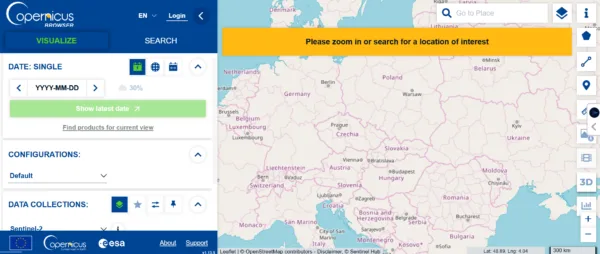
Copernicus Browser is the European Space Agency’s free platform for accessing Sentinel satellite data. It is one of the best free tools available for anyone doing environmental monitoring, vegetation analysis, or land cover work.
The Sentinel-2 dataset is the one most people use. It gives you 10-meter resolution optical imagery with global coverage that updates every five days. You can filter by date, set a maximum cloud cover percentage, and view the results directly in your browser without downloading anything first.
Beyond the standard true-colour view, there are processing options built in. NDVI, false colour infrared, and several other indices are available with one click. You can also compare two images side by side, create a timelapse, and download full tiles.
A free account unlocks additional features like pinning imagery for future reference and using the 3D viewer.
- Best for: Environmental monitoring, vegetation health, land cover classification, research
- Limitation: 10m resolution is the standard. It is not suitable for site-level analysis where you need to see individual buildings, vehicles, or structures.
3. USGS EarthExplorer
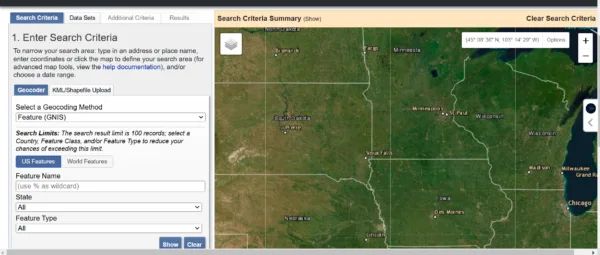
USGS EarthExplorer is one of the richest free satellite and aerial image archives available anywhere. It covers Landsat missions, declassified historical aerial photography, digital elevation data, radar imagery, and land cover maps, much of it going back decades.
To use it, draw your area of interest on the map, select a date range if needed, and choose your dataset. The Dataset Prefilter option is worth using, it removes datasets that have no coverage for your selected location, which saves time.
Results show footprints on the map, image metadata, and download options. Most data is free to download with a free account. If an image is in the archive but not yet digitised, you can request a scan for $30.
- Best for: Historical analysis, land use change detection, Landsat time series, research datasets
- Limitation: The interface takes some getting used to. It is built for researchers and GIS professionals, not casual users.
4. NASA Worldview
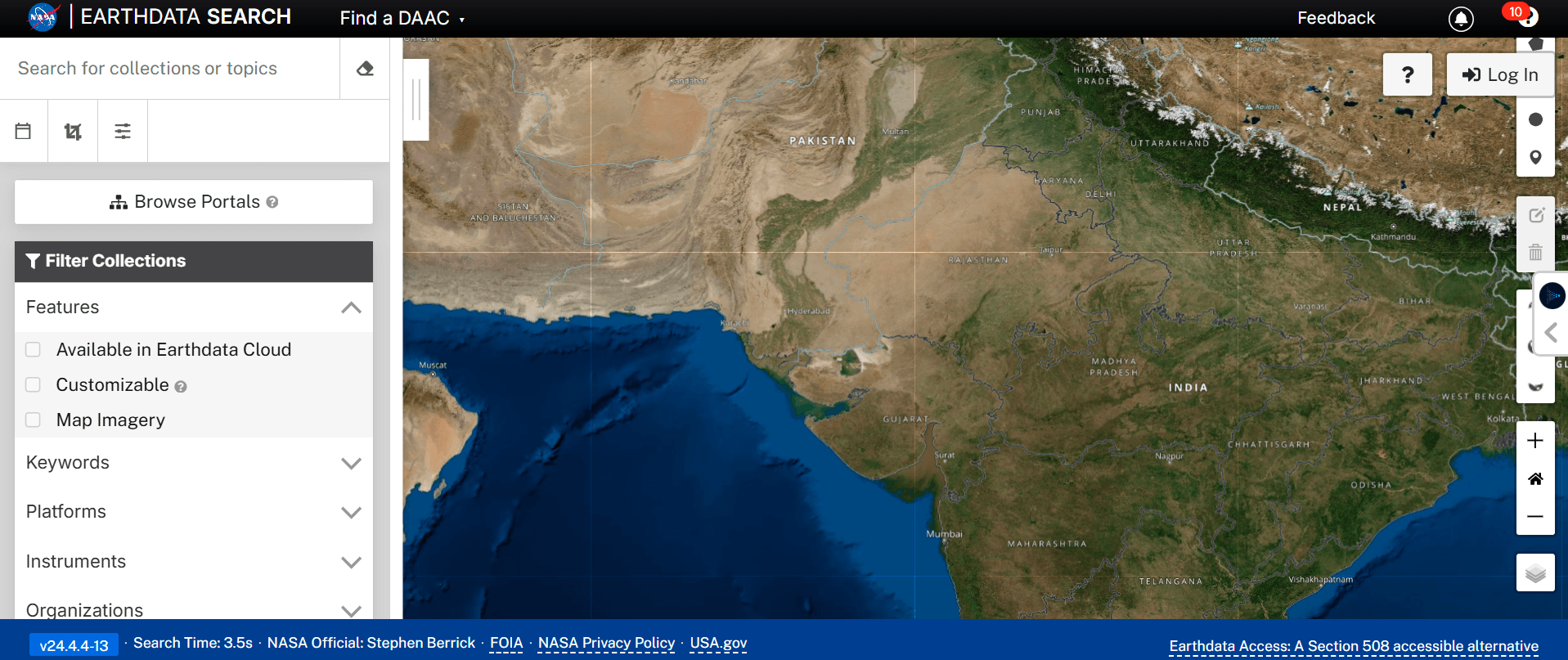
NASA Worldview is the fastest way to see near real-time satellite imagery of the entire planet. It pulls data from NASA’s EOSDIS system and updates within hours of capture for some datasets.
It is particularly useful for monitoring active events. Fire hotspots, dust storms, flood extents, and atmospheric conditions are all visible as dedicated layers. You can overlay multiple datasets, compare dates, and download imagery for your area.
There is no signup needed to browse and view data.
- Best for: Near real-time monitoring, disaster events, fire and flood mapping, atmospheric data
- Limitation: Resolution is generally moderate. It is not the right tool for detailed site analysis.
5. ESRI World Imagery Wayback
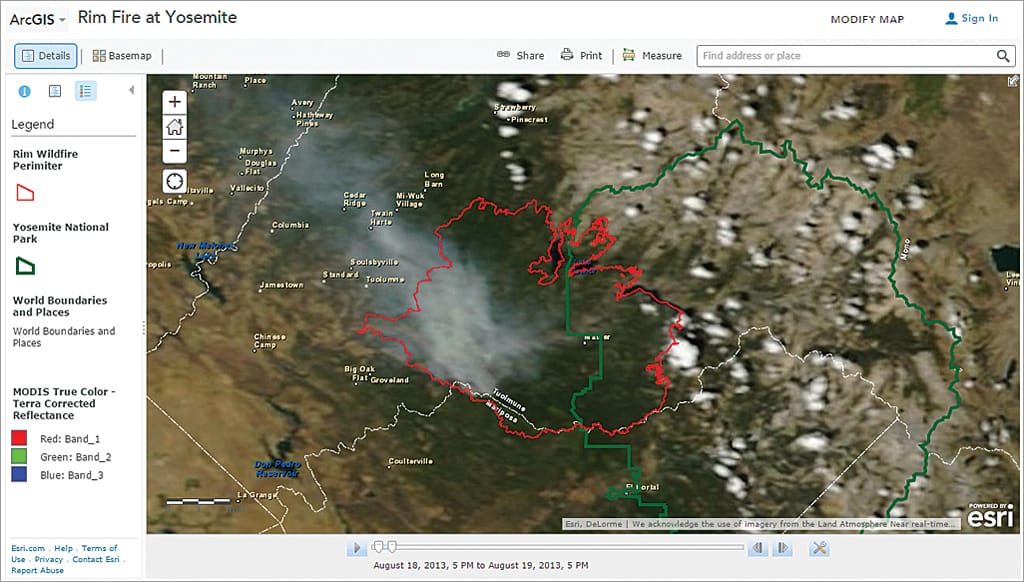
ESRI World Imagery Wayback is a browser-based archive of historical ESRI satellite basemaps. It shows you how a specific location has changed over time using ESRI’s own imagery updates.
The Swipe Mode tool lets you compare two dates side by side. The Animate mode creates a timelapse from available captures that you can download as a GIF. Both are useful for change detection and visual reporting.
It is not as deep an archive as Google Earth’s historical imagery, but it is a clean and easy tool for browser-based comparisons.
- Best for: Before and after comparisons, change detection, visual reporting
- Limitation: Archive depth varies by location and is limited to ESRI’s update history.
6. Vantor (Maxar SecureWatch Free Tier)

Maxar now Vantor is one of the largest commercial satellite imagery providers in the world, operating WorldView and GeoEye satellites that capture imagery at 30cm to 50cm resolution. Their free tier gives you access to a global high-resolution basemap built from this imagery.
You can browse the basemap, view recent imagery for many locations, and use it as a reference layer in GIS workflows. For professionals who already work in Maxar’s ecosystem, the free tier is a useful starting point before committing to a paid order.
Maxar also makes some historical imagery available through their Discover platform at no cost for browsing and preview.
- Best for: High-resolution basemap reference, previewing Maxar archive before purchasing, GIS background layers
- Limitation: Full-resolution downloads and fresh tasking require a paid subscription. Free access is for viewing and basemap use only.
When Free Imagery Is Not Enough

Free platforms are genuinely useful for wide-area monitoring, research, and general analysis. But they have a hard ceiling.
Here is where free data runs out:
- You need imagery from a specific date or after a specific event
- Your project needs 25cm to 80cm resolution to see buildings, vehicles, or site detail
- You need cloud-free capture over your exact area
- You need data in GeoTIFF or DWG format ready for QGIS, ArcGIS, or AutoCAD
- You need SAR data to see through cloud cover
For these cases, commercial imagery is the next step. XRTech archive imagery starts at $1/km² for 2m resolution and $5/km² for 80cm. That is a small cost for a significant jump in detail, and archive orders are delivered in 48 hours.
If you need fresh imagery captured on a specific date, new tasking starts at $8/km² with delivery in under 7 days for any location on Earth.
Get a free imagery quote from XRTech, we respond within 24 hours and include a free sample tile with every enquiry.
Free vs Paid Satellite Imagery – Quick Comparison
| Feature | Free platforms | XRTech commercial |
|---|---|---|
| Best resolution | 10m (Sentinel-2) | 25cm |
| Archive access | Yes | Yes — back to 1999 |
| Specific date capture | No | Yes — new tasking |
| Cloud-free guarantee | No | Yes |
| GeoTIFF / DWG delivery | Limited | Yes |
| SAR / radar data | Limited | Yes |
| Price | Free | From $1/km² |
FAQs
1. What is the best free source of satellite imagery in 2026?
Google Earth Pro is the best for visual clarity and image exports. Copernicus Browser is the best for scientific and multispectral analysis. USGS EarthExplorer has the deepest historical archive. The right choice depends on what you need the data for.
2. Can I download satellite images for free?
Yes. Google Earth Pro, USGS EarthExplorer, Copernicus Browser, and NASA Worldview all let you download imagery for free. Some require a free account to access downloads.
3. What resolution is available for free?
Sentinel-2 from Copernicus Browser gives you 10m resolution globally. Some Landsat data from USGS EarthExplorer is available at 15m to 30m. Sub-meter resolution is not available for free — that requires commercial imagery.
4. Is Google Earth Pro really free?
Yes. Google Earth Pro is completely free to download and use. It was previously sold for $400 per year before Google made it free in 2015.
5. Can I get satellite imagery of a specific date for free?
You can search by date on USGS EarthExplorer, Copernicus Browser, and NASA Worldview. However, you cannot guarantee cloud-free capture on a specific date. Commercial tasking is the only way to get a guaranteed fresh image on a date you choose.
6. What is the difference between free and paid satellite imagery?
Free imagery is pre-collected, lower resolution, and you have no control over capture date or cloud cover. Paid imagery gives you resolutions down to 25cm, cloud-free guarantees, on-demand tasking, and delivery in GIS-ready formats.
7. Can I use free satellite imagery for commercial projects?
It depends on the source. Sentinel and Landsat data from ESA and USGS are open licence and free for commercial use with attribution. Google Earth imagery has restrictions — you cannot use screenshots for commercial publication. Always check the licence terms for the specific dataset.
8. What is the best free tool for monitoring change over time?
Google Earth Pro’s historical imagery timeline and ESRI World Imagery Wayback are both strong options. For scientific-grade time series, USGS EarthExplorer with Landsat data is the most complete archive.
9. Is there free SAR satellite imagery?
Yes. Sentinel-1 SAR data from ESA is free and accessible through Copernicus Browser and other platforms. It gives you C-band radar imagery useful for flood mapping and change detection.
10. When should I switch from free to paid satellite imagery?
When your project needs imagery from a specific date, resolution better than 10m, cloud-free capture, or GIS-ready format delivery. XRTech archive imagery starts at $1/km² — it is worth checking whether the small cost solves the limitation you are hitting with free data.
Free Satellite Imagery Blog Summary
- Google Earth Pro is free and lets you export high-resolution images directly to your computer
- Copernicus Browser gives you 10m resolution Sentinel-2 data updated every few days
- USGS EarthExplorer has one of the largest free satellite image archives on Earth going back decades
- NASA Worldview is the fastest way to see near real-time global satellite data including fires and floods
- ESRI World Imagery Wayback lets you compare how any location has changed over time
- Maxar SecureWatch Free Tier gives access to high-resolution basemap imagery through a free account
- Free imagery is useful for wide-area monitoring, research, and general analysis
- Free platforms max out at 10m to sub-meter resolution — they do not offer on-demand tasking
- For 25cm to 80cm resolution with fresh capture on a specific date, you need commercial imagery
- XRTech archive imagery starts at $1/km² and is a cost-effective step up from free data when your project needs more detail